.png)
Ever since AWS announced Lambda durable functions at re:Invent 2025, I’ve been wanting to try them on a real project. Not a cookie cutter tutorial, but something where I could actually compare the two approaches. I already had the perfect candidate: my weather site.
Quick Background
If you haven’t read my original blog post, here’s the short version. I built isitsnowinginhillsboro.com because the existing Portland snow site wasn’t accurate for my area. It’s a serverless workflow that checks the OpenWeatherMap API every 10 minutes and updates a static S3 site with a YES or NO answer. The original uses a Step Function triggered by EventBridge Scheduler.
Why Rewrite It?
I think a lot of us have been wondering when you’d pick durable functions over Step Functions. This project was small enough to rewrite quickly, but complex enough to exercise real patterns like API calls, branching logic, parallel execution, and multiple AWS services. Building the same thing both ways seemed like the best way to form my own opinion.
The durable function version is here on GitHub.
How the Two Approaches Compare
The workflow logic is identical in both versions. Same end result. But the developer experience is pretty different.
Step Functions
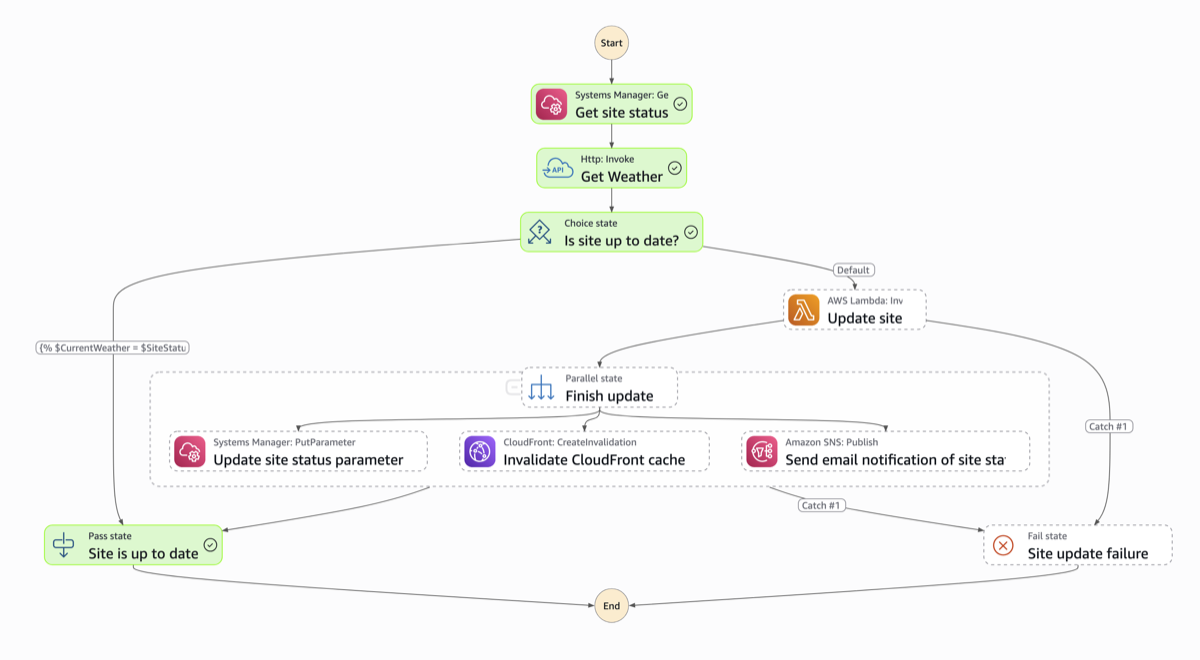
You define your workflow as a state machine, chaining together states like LambdaInvoke, Choice, Pass, and direct SDK integrations in CDK. The visual representation in the console is nice for understanding the flow at a glance, and it feels very “managed” in the best sense. The service handles state tracking, retries, and transitions for you.
The tradeoff is that CDK code for Step Functions can get verbose. Passing data between states and setting up error handling means understanding how Step Functions manages its JSON payload. You’re giving up some control for the convenience of the service doing the heavy lifting.
Durable functions
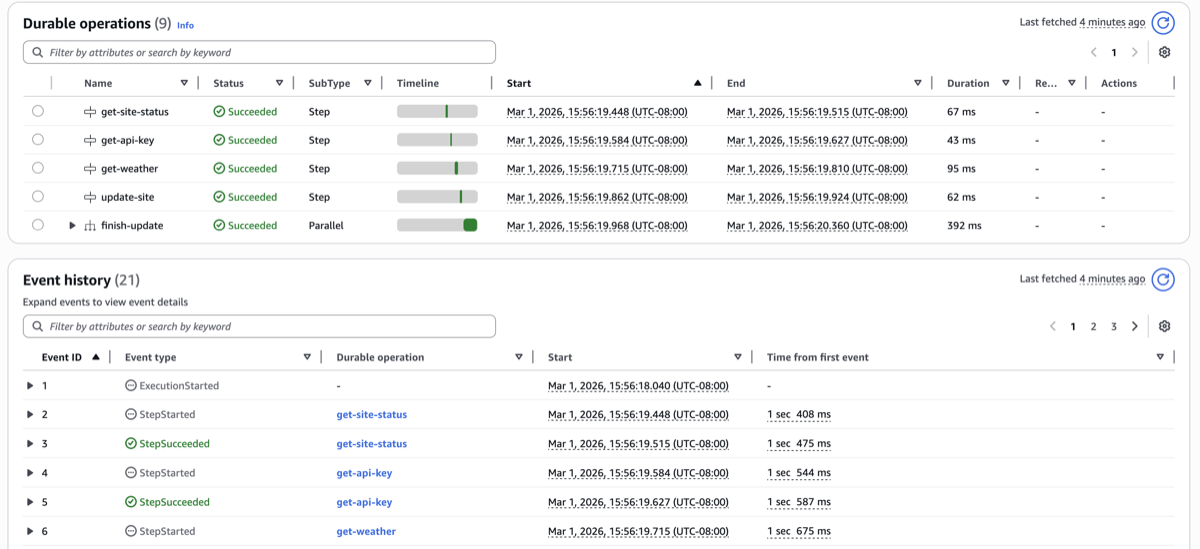
With durable functions, you write your workflow as plain TypeScript. Wrap your logic in ctx.step() calls, use regular if statements for branching, ctx.parallel() for parallel execution. Need to call an AWS service? Just use the SDK like you normally would inside a step.
Here’s the thing that surprised me: this version felt more natural to write. I wasn’t thinking about “states” or “transitions.” I was just writing code. Since it’s TypeScript with a thin SDK wrapper, it also feels more portable. If another cloud provider or open source project adopted a similar checkpoint/replay pattern, the mental model (and probably a good chunk of the code) would transfer over.
Side by Side
| Concept | Step Functions | Durable functions |
|---|---|---|
| Workflow definition | JSON/YAML state machine (ASL) | Plain TypeScript code |
| State management | Managed by the service | Automatic checkpointing via SDK |
| AWS service calls | CallAwsService task or direct integration | Regular AWS SDK calls inside ctx.step() |
| HTTP calls | HttpInvoke task + Connection resource | Standard fetch() inside ctx.step() |
| Conditional logic | Choice state | Plain if statement |
| Parallel execution | Parallel state | ctx.parallel([...]) |
| Scheduling | EventBridge Scheduler -> Step Function | EventBridge Scheduler -> Lambda |
| Infrastructure | State Machine + Connection + Lambda(s) | Single Lambda function |
| Debugging | Step Function execution history (visual) | Durable execution history |
The Gotcha That Got Me
Durable functions require a qualified ARN for invocation, meaning a published version or alias. When I first wired up EventBridge Scheduler, I was using the unqualified ARN and couldn’t figure out why it wasn’t working.
The issue? The CDK LambdaInvoke scheduler target uses functionArn under the hood, which for a plain Function is the unqualified ARN — no version or alias suffix. Durable functions reject unqualified ARNs entirely.
What ended up working was creating a Lambda alias in CDK and passing that to the scheduler target instead. Since an alias implements IFunction, the construct picks up its qualified ARN automatically.
If you’re getting started with durable functions and things aren’t behaving as expected, check your invocation ARN first.
So Which One Should You Use?
In my opinion, both approaches are solid for a workflow like this. It really comes down to developer experience.
If you prefer writing workflows as code, durable functions are going to feel great. The code reads like a normal application, the infrastructure footprint is smaller, and the patterns are more transferable if you ever need to move beyond AWS.
If you value visual debugging and a fully managed experience, Step Functions has the edge right now. The console gives you a step-by-step view of every execution with clear status indicators. Durable functions have a visual for execution history too, but I prefer how Step Functions handles it.
If you need Distributed Map for massive fan-out scenarios (up to 10,000 concurrent executions) or rely heavily on Step Functions’ 220+ native service integrations, Step Functions is the better option.
AWS also has official guidance. One thing I found interesting is they mention that hybrid architectures are totally valid, using durable functions for application-level logic while Step Functions handles higher-level cross-service coordination.
Wrapping Up
If you’re curious about durable functions, I’d encourage trying it with a project you already have. You’ll learn way more than a tutorial can teach you.
Both repos are open source:
- Step Functions version: github.com/deeheber/weather-site
- Durable functions version: github.com/deeheber/durable-function-weather-site
I’d love to hear from anyone else who’s been experimenting with durable functions. Let me know what your experience has been! 🚀