.png)
Photo by Markus Winkler on Unsplash

Quick disclaimer before I get into this: I’m no longer actively job hunting. I started building this project during my last job search and decided to finish what I started. Partly because I wanted to learn more about agents and partly because I think it might be useful for someone else out there. With that out of the way, here’s the story.
The Problem
Ever since I started my last job search, one thing kept bugging me. I had a list of “dream companies” that I wanted to work at, and I’d manually go check their career pages every few days to see if anything new popped up. Sometimes daily. Sometimes I’d forget for a week and miss a posting entirely.
Here’s the thing: job searching is already stressful enough without having to remember to check 10+ career pages on a regular cadence. I’d open a browser tab, search around, get distracted by Slack or email, and then forget where I left off. Multiply that by several companies and it becomes a real time sink.
I kept thinking there has to be a better way. What if something could just watch those companies for me in the background and send me an email when there’s an opening that matches what I’m looking for?
That’s when I decided to build it myself.
What I Built
The job-search-agent is an AI agent built with Strands Agents and deployed to Amazon Bedrock AgentCore Runtime. You give it a company name (and optionally a job title or location filter), and it searches the web for open positions at that company. Then it returns what it finds with links to the actual job postings.
You can also set it up to run on a schedule and optionally send you email alerts when a company is hiring. That’s the part I was most excited about.
Design Decisions
Here’s how the architecture works at a high level:
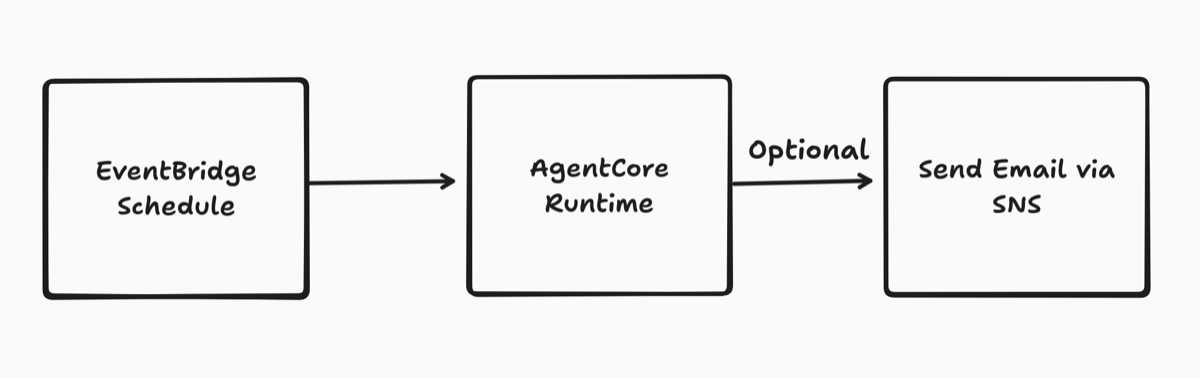
EventBridge Scheduler kicks things off on whatever cadence you configure. This triggers the agent running in AgentCore Runtime, which is where the Strands agent lives. The agent does its thing (searching for jobs at the companies you’ve specified), and if you’ve provided one or more email addresses in the environment variables and there is a job posting, it sends the results via SNS as an email notification.
The infrastructure is all defined in CDK (TypeScript), and the agent code is Python. I talked about why I use that particular combo in my strands-agent-template post, but the short version is that each framework is strongest in its native language right now.
Is this a bit over-engineered for what it does? Most likely. But I wanted to use the opportunity to build something I’d actually use while learning about agents and AgentCore. In my experience, the best way to learn new tech is to solve a real problem with it, even if the solution is fancier than it needs to be.
Challenges
When I first started building this, I took what felt like the simplest approach. I put instructions in the agent’s system prompt to construct the career page URLs for each company. Something along the lines of “for company X, try going to company.com/careers and look for job postings.”
This didn’t work well at all.
The agent would guess at URLs that didn’t exist, hallucinate job listings, and burn through a ton of tokens trying to figure out where the careers page actually was. Some companies have their postings on Greenhouse. Others use Lever, Ashby, or their own custom systems. There’s no standard for this, and asking an LLM to guess the right URL is a recipe for frustration.
So I decided to build a tool for the agent to use instead. During that research, I came across Tavily, which is a search API built specifically for AI agents. Even better, Strands already had a pre-built Tavily tool available. I plugged it in, and the difference was night and day. Instead of guessing URLs, the agent now searches the web for actual career pages and job boards, then extracts the relevant information from those results.
This was a good reminder for me that agents are only as useful as the tools you give them. The LLM is great at reasoning and formatting responses, but it shouldn’t be doing the heavy lifting of web searching through prompt instructions alone.
There was one more quirk worth mentioning. EventBridge Scheduler supports universal targets, which let you call pretty much any AWS API action directly without needing a Lambda function in between. You just give it the service ARN and the request payload, and it makes the API call for you. There’s a list of unsupported action prefixes in the docs (things like get, describe, list). Interestingly, invokeModel is explicitly blocked, but invokeAgentRuntime is not.
So I set up EventBridge Scheduler to call the Bedrock AgentCore invokeAgentRuntime action on a schedule. And it works. The agent gets invoked, does its thing, and returns results. But for some reason, EventBridge Scheduler thinks the invocation failed. Every single time.
If you leave retries enabled, the scheduler will retry the invocation multiple times even though the first call succeeded. That means your agent runs (and costs you money) three or four times instead of once. Also you may get duplicate email notifications. Not great.
My workaround was to disable retries on the scheduler and set up a Dead Letter Queue (DLQ) to capture these “failed” invocations so I can monitor them. I’m honestly not sure if this is something I’m doing wrong or if it’s a quirk on the AWS side that’ll get fixed eventually. AgentCore is still pretty new, so it’s possible this just hasn’t been ironed out yet. If you’ve run into something similar, I’d love to hear about it.
The Outcome
After getting Tavily integrated, the agent started returning real job listings with real links. I set up EventBridge to run the searches on a schedule and configured SNS to email me the results.
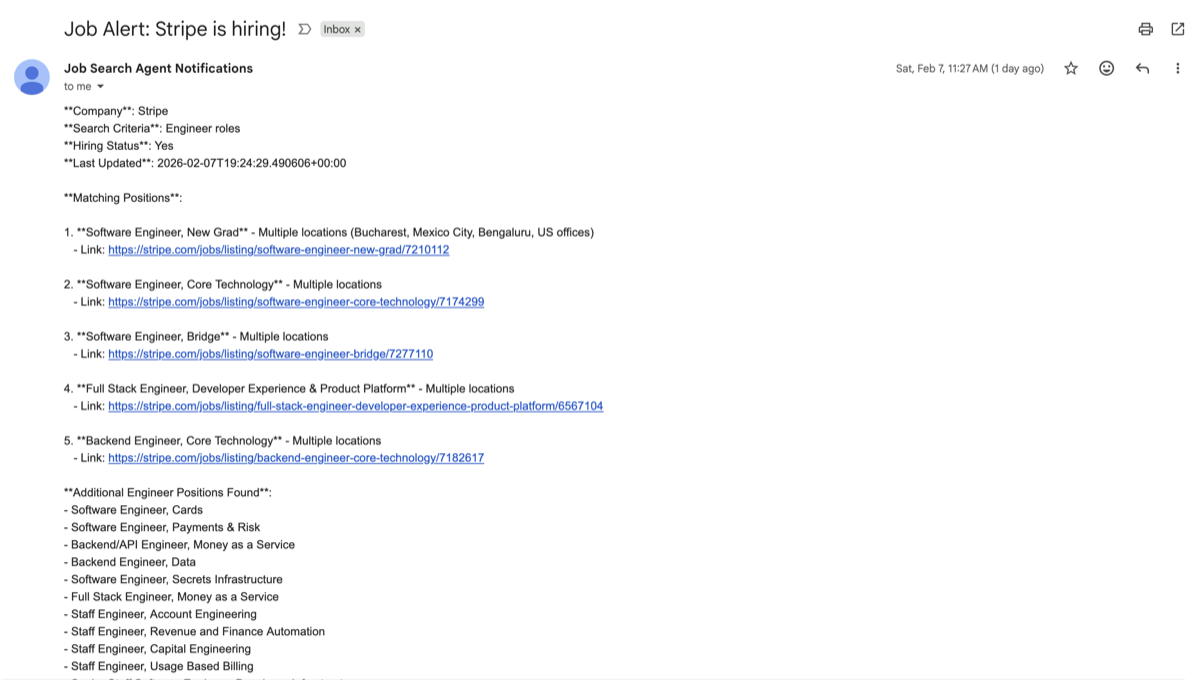
The time savings were immediately obvious. Instead of spending 30+ minutes bouncing between career pages every few days, I’d get an email in my inbox with a summary of who’s hiring and links directly to the postings. Even when nothing new showed up, it was nice to not wonder if I’d missed something.
A Note on Cost
If you decide to deploy this yourself, keep in mind that it will cost you money. Specifically:
Bedrock usage is the main cost driver here. Every time the agent runs, it’s making calls to a foundation model, and those tokens add up. How much depends on how many companies you’re monitoring and how often the scheduler runs.
Tavily has a free tier that’s pretty generous for personal use, but if you’re running searches frequently or monitoring a lot of companies, you could exceed it. Keep an eye on your usage.
I’d recommend starting with a low frequency schedule (maybe once a day or even once a week) and a small list of companies to get a feel for the costs before scaling up.
Everything else in the stack (AgentCore Runtime, EventBridge Scheduler, SNS) will likely fall within the AWS free tier for personal use. But “likely” isn’t a guarantee, so check the pricing pages against the usage you expect before deploying.
What I Learned
I think the biggest takeaway from this project is that building something you actually need is still the best way to learn new tech. I could have followed a tutorial to build a generic chatbot, but because this was solving a real problem for me, I was way more motivated to push through the frustrating parts.
If you’re curious about agents but not sure where to start, I’d suggest finding a small, annoying, repetitive task in your life and trying to automate it. It doesn’t have to be fancy. The learning happens in the process of figuring out what works and what doesn’t.
Give It a Try
The full source code is on GitHub. It includes instructions for running locally and deploying to AWS.
If you’re currently job hunting and this looks useful, take it for a spin. If you find bugs or have ideas for improvements, open an issue or submit a PR. I’m curious to hear what other folks build with it.
Good luck out there 💪