
Update (September 8, 2026): Async didn’t fix the timeouts. I still don’t know why they happen, but I’m leaving this post up for what I learned about async in AgentCore and Strands.
The DLQ alarm was already triggered, and no new job alerts meant I missed the duplicate emails. I disabled retries and removed the DLQ and alarm. I’m okay with risking a missed search here.
I now get emails for errors, matches, and no matches. No email means I should check whether the search or the notification failed.
A while back I wrote about letting an AI agent do your job searching. That post ended with a quirk I couldn’t explain. EventBridge Scheduler would invoke my agent, the agent would run fine, I’d get the email, and the invocation would land in the dead letter queue anyway. Every single time.
I figured I was either doing something wrong or hitting an AgentCore bug. Turns out it was neither.
The Actual Problem
EventBridge Scheduler universal targets (the feature that lets Scheduler call almost any AWS API action directly, no Lambda in between) are synchronous. Scheduler makes the API call and waits for a response before deciding whether the invocation succeeded. The docs describe this as at-least-once delivery, where at least one delivery succeeds with a response from the target. I glossed over that last part.
My schedule was calling the Bedrock AgentCore invokeAgentRuntime action, which blocks until the agent finishes. A search takes 30 to 75 seconds. Scheduler gives up around the 30 second mark and marks the invocation failed. The agent, which has no idea any of this happened, keeps going, finishes the search, and publishes to SNS. I get my email. The “failed” invocation goes to the DLQ. Here’s what one of those messages looks like:
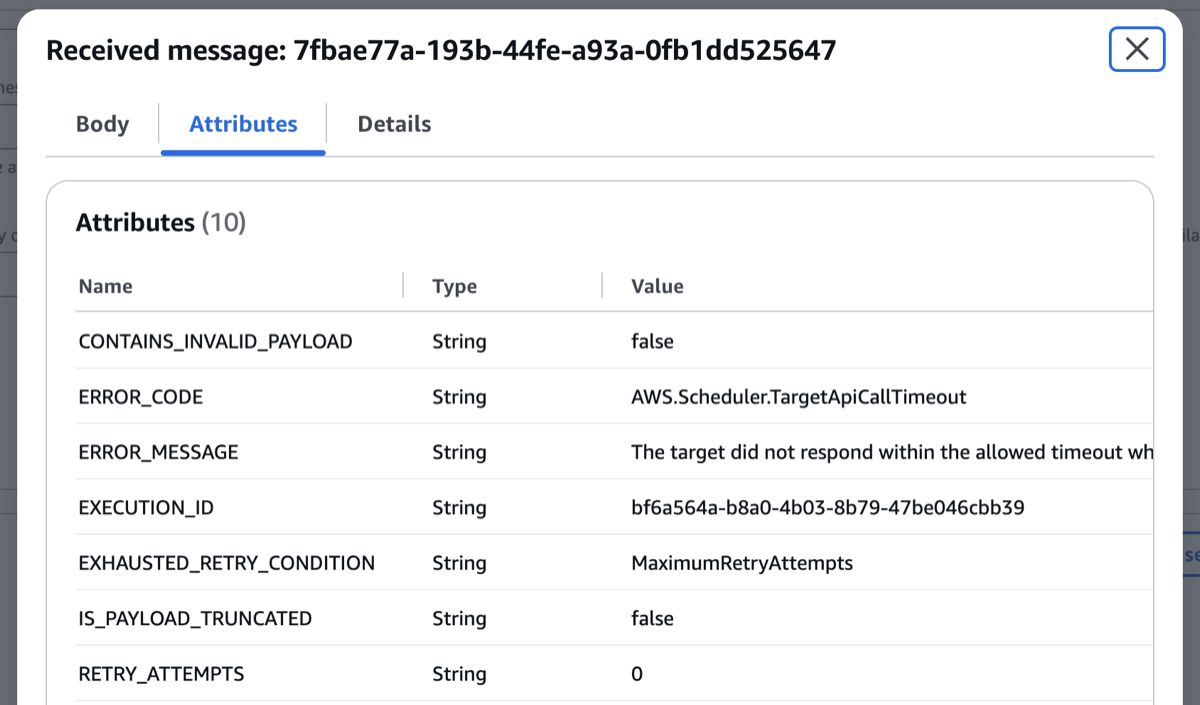
Everything downstream worked. The only broken part was Scheduler’s opinion of it.
About That 30 Seconds
I went looking for this in the docs and could not find it. The EventBridge Scheduler quotas page covers number of schedules, API request rates, and invocation throughput. Nothing about how long Scheduler waits for a target to respond.
The one timeout you can configure is MaximumEventAgeInSeconds in the retry policy. That’s the maximum age of an event across retries, not a per-call limit. Different thing.
So treat ~30 seconds as an observed number, not a contract. In my opinion the safer bet is designing against “Scheduler will not wait long” rather than a specific value.
The Fix
Instead of making the search faster, I made the response faster. The entrypoint now kicks the search off as a background task and returns immediately, so Scheduler gets its response well inside the window and the agent runs for as long as it needs to (up to AgentCore’s 8 hour session cap, which my searches are nowhere near).
AgentCore has first-class support for this. You register the background work with add_async_task, the runtime reports HealthyBusy on /ping while it’s in flight, and the session stays alive instead of getting reaped. That last part matters because AgentCore terminates sessions after 15 minutes of idle, and without task tracking your background work looks exactly like idle. The async processing docs cover the pattern.
Here’s the relevant part of the entrypoint:
# strong refs: asyncio only weakly references tasks
_background_tasks: set[asyncio.Task[Any]] = set()


async def _tracked_job_search(company: str, title: str, location: str) -> None:
    """Run the job search as a tracked async task so ping reports HealthyBusy."""
    task_id = app.add_async_task("job_search")
    try:
        await run_job_search(company, title, location)
    finally:
        app.complete_async_task(task_id)


@app.entrypoint
async def invoke(payload: dict[str, Any] | None = None) -> dict[str, Any]:
    """Main entrypoint for the agent invocation."""
    # ...payload validation...

    if payload.get("sync"):
        return await run_job_search(company, title, location)

    # Respond before EventBridge Scheduler's ~30s call timeout DLQs the invocation
    task = asyncio.create_task(_tracked_job_search(company, title, location))
    _background_tasks.add(task)
    task.add_done_callback(_background_tasks.discard)

    return {
        "status": "accepted",
        "search_criteria": {"company": company, "title": title, "location": location},
    }
Scheduler gets {"status": "accepted"} in well under a second. The search runs in the background. No more DLQ.
A Few Things to Watch For
The Strands call has to be awaited. I was calling agent(prompt) inside an async def entrypoint, which blocks the event loop. Survivable when the entrypoint blocked anyway. But once the runtime needs to answer health checks mid-search, a blocking call starves everything. Switching to await agent.invoke_async(prompt) was required, not a style preference.
Hold a reference to the task. asyncio only weakly references tasks from create_task, so an unreferenced task can get garbage collected mid-run. That’s the _background_tasks set above, lifted straight from the pattern in the Python docs. It usually works fine right up until it doesn’t.
Keep a synchronous path. Fire and forget is great for the scheduler and terrible for local development. A "sync": true flag in the payload runs the search inline and returns the full result. That’s what I use for curl and the AgentCore playground.
One More Thing About Retries
In the original post I disabled retries, because Scheduler retrying a “failed” invocation meant duplicate agent runs and duplicate emails. The CDK target default is 185 retries with exponential backoff over up to 24 hours, so every scheduled search was set up to keep re-running (and re-billing) until I caught it.
With the async path, I turned retries back on (retryAttempts: 0 to 2). Now Scheduler gets an ack right away, so it won’t keep retrying while the search is still running. There’s still a small chance of a duplicate if the ack gets lost, but that’s a trade-off I’m comfortable with here.
There’s a tradeoff here. Scheduler now only confirms your agent started. It says nothing about whether the search actually worked. If the search blows up 40 seconds in, Scheduler is happy and your DLQ stays empty. You need logs, metrics, or the notification itself to know the work finished. For me a missing email is a loud signal. If your silence is more ambiguous, plan for that.
If You’re Hitting This
If you’re invoking AgentCore Runtime from an EventBridge schedule and seeing DLQ messages for runs that clearly worked:
- Check how long your agent actually takes. Anything over ~30 seconds is suspect.
- Return an ack from your entrypoint instead of the result.
- Wrap the real work in
add_async_task/complete_async_taskso the runtime knows to keep the session alive. - Make sure nothing in that background path blocks the event loop.
Code is in the job-search-agent repo and the change is PR #51 if you want to see the whole diff.
None of this is AgentCore specific. Any long-running universal target invoked from EventBridge Scheduler has the same problem. Agents just happen to be really good at being slow. 😅
If you’ve hit this with a different long-running target, or if you’ve found the actual timeout documented somewhere I missed, I’d love to hear about it.